
Reference

Auto Roulette at jco69

Auto Roulette on jco69 gives you an automated roulette table with a clear wheel view, visible betting areas and round results in one screen.

Automated roulette roundsInside and outside betsPhone-friendly table viewVisible round history
jco69 Auto Roulette at jco69
jco69 How Auto Roulette Works

How Auto Roulette Works

Auto Roulette is a roulette table format where rounds move automatically instead of relying on a dealer-led conversation. You choose a betting area, place chips before the timer closes, then watch the wheel result appear on the table display. The game tile in our lobby shows its provider label and table details before you enter. This format suits you if you want

roulette rules and bet choices without waiting for a live-table seat or dealer interaction.

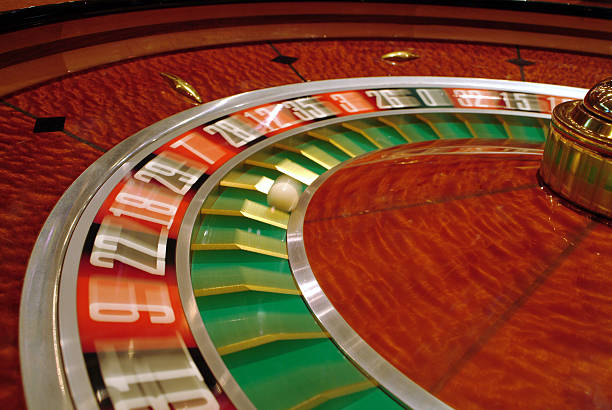
WHEEL FOCUS

Three Auto Roulette Details

The appeal of Auto Roulette is its straightforward table rhythm. Each round follows the same visible sequence: betting time, wheel movement, result display and a fresh betting window.

Updated today
jco69 Timed chip placement
BETTING WINDOW

Timed chip placement

A countdown shows when the table is accepting chips and when the betting phase is closing. Place your selection before that window ends, then wait for the wheel result rather than trying to change a bet during the result sequence.

jco69 Visible bet zones
TABLE LAYOUT

Visible bet zones

The layout separates number selections from broader colour, parity and range choices. You can tap a section directly on a phone screen or use the larger desktop table view, with your selected chips shown before confirmation.

jco69 Result tracking
ROUND DISPLAY

Result tracking

Recent outcomes are displayed beside the active table so you can see completed rounds without leaving Auto Roulette. Those results describe prior spins only; each new wheel outcome remains a separate event under the table rules.

BETTING FLOW

Auto Roulette Gameplay Choices

Before a round begins, Auto Roulette lets you select a stake and place it on the table areas shown on screen.

Enter from the casino lobby Use the casino category after logging in, then select Auto…
Read the table panel Open the rules and limits panel before your first chip…
Choose a betting area Tap the numbered grid or one of the wider outside…
Follow the round timer The timer is the practical signal for each stage of…
TABLE FACTS

Auto Roulette Session Details

Clear table facts matter before you enter Auto Roulette. We show the game in the casino lobby, while the in-game panel is where you check the version-specific rules and current limits.

01

Game type

Auto Roulette is an automated roulette table game. You make selections on a digital table layout during the betting period, then the round result is displayed after the wheel sequence completes.

02

Volatility

Table games do not present volatility in the same way as slot titles. Check the game rules for the available roulette selections and their stated payout structure before joining a round.

03

Supported devices

The table is available through a mobile browser and desktop browser after login. On phones, controls are arranged around the active table view so you can inspect selections without opening a separate page.

04

Access region

Auto Roulette availability in Indonesia depends on local law. When the game is available to your account, enter it through the casino lobby after completing the required phone verification step.

PHONE TABLE

Auto Roulette on Your Phone

Phone access keeps Auto Roulette close to the casino lobby without requiring a separate app.

Casino category shortcut
Tap-to-place chip controls
Wheel and timer together
Desktop browser option
jco69 mobile gaming
TABLE HELP

Help With Auto Roulette Access

A stalled table should not leave you guessing about your next step. Our account help is positioned close to the cashier path, but Auto Roulette questions should begin with the game screen…

Game tile will not open Return to the casino lobby and refresh the Auto Roulette tile after checking your account login state. If the issue continues, send support the game name, your device type and the time the table failed to load.
Round display question Check the on-table result area and rules panel first. For a specific round question, contact support from the logged-in path with the displayed round reference, table name and a clear description of the screen result.
Phone verification blocks entry Complete the phone verification step shown in your account before returning to Auto Roulette. If the code does not arrive or the status does not update, use account help and describe the verification stage that stopped.
FAIR PLAY CHECKS

What We Show At Table

Auto Roulette should be assessed from the game screen, not broad claims. We direct you to the provider label, rules panel and result display attached to the actual table tile.

Provider label

The Auto Roulette game tile identifies the provider shown for that table version. Check this label before entry if you want to compare the table with another roulette option available in the casino category.

Rules panel

The in-game rules panel is the source for the version-specific table details. Read it before placing chips, especially when checking the available selections, round sequence and any limits displayed for your session.

Result area

Completed outcomes appear in the table result area after a round finishes. This display lets you inspect the reported result without leaving the game screen or confusing a current betting window with a completed round.

Visible timer

A timer distinguishes open betting from the closed stage of the automated round. This gives you a clear on-screen point for chip placement rather than relying on an estimated wheel start.

Account verification

Phone verification is completed before account access to the casino lobby. If Auto Roulette does not open after login, check this account status first before treating the issue as a table problem.

Access wording

We state that Auto Roulette access in Indonesia depends on local law. Check what is available through your own logged-in lobby, where local law permits, rather than assuming every table is available.

Auto Roulette Beside Other Games

Auto Roulette is a focused table choice within our casino selection, while other lobby titles use different formats and controls.

Auto Roulette
Choose this table when you want automated roulette rounds, chip placement on a visible layout and a timer-led betting sequence. It is designed around wheel results rather than slot reels, fishing controls or bingo cards.
Live baccarat
Live baccarat uses dealer-table presentation and baccarat betting choices instead of a roulette wheel. Select it when you prefer card-table context; return to Auto Roulette when you want the automated wheel format.
Blackjack
Blackjack centres on card totals and table decisions, which differs from Auto Roulette number and outside-area selections. The casino lobby keeps both categories accessible after login, with each tile opening its own rules panel.
Dragon Tiger
Dragon Tiger is another card-table format with a simpler comparative choice between its named sides. Auto Roulette offers a different visual structure, using a wheel result and multiple betting positions across the table layout.
Royal Fishing
Royal Fishing uses action-style screen controls rather than roulette chips and a timed wheel. It can suit you when you want a fishing room, while Auto Roulette remains the direct choice for table-based number selections.
bingo777
bingo777 is built around bingo-style play and its own card display. Auto Roulette keeps every key action on the roulette table, including the betting grid, timer and result area for each automated round.
rocketslot
rocketslot is a slot title with reel-based play, while Auto Roulette follows roulette table rules. Use the lobby categories to separate these formats, then open the tile that matches the game structure you want.
TABLE HIGHLIGHTS

Six Auto Roulette Highlights

Auto Roulette keeps its important actions close together: game entry, betting layout, countdown and round outcome.

Automated round pace The table advances through a defined sequence without a dealer…
Number-grid selections The central grid gives you a direct place to select…
Outside betting areas Broader roulette choices are presented around the main grid, making…
On-screen countdown A clear countdown helps you understand the current table stage.
Round result display The result area records completed Auto Roulette rounds in the…
One lobby return path Leaving the table returns you to the casino lobby within…

Questions About Auto Roulette

These answers cover the practical details you may want before opening Auto Roulette from the casino lobby. We focus on the table format, mobile entry, rules panel and account steps rather than unrelated casino topics. For a specific round issue, use the logged-in support path with the table name and displayed reference. Auto Roulette availability in Indonesia depends on local law, so check the games shown in your own account.

Auto Roulette is an automated roulette table game in the jco69 casino lobby. You place chips during the visible betting period, the wheel sequence runs after the timer closes, and the completed result appears in the table display.

Log in, complete the phone verification step required before account access, then open the casino category and select the Auto Roulette tile. The game opens from the lobby when it is available to your account where local law permits.

Auto Roulette follows an automated table format rather than dealer-led table conversation. The active screen centres on the betting layout, round timer, wheel sequence and result display. Check the game tile and rules panel for the table version shown.

Yes, you can access Auto Roulette through a mobile browser after logging in. The phone view keeps the wheel, betting controls and timer in the game path. If you prefer more table width, use the desktop browser version.

Open the rules panel inside the Auto Roulette table before placing a chip. That panel contains the table-specific details for the version you entered, including the displayed betting structure and other conditions shown for that session.

First check that your login and phone verification status are complete, then return to the casino lobby and refresh the Auto Roulette tile. If it still does not load, contact support from your account with your device type and the time.

Auto Roulette availability in Indonesia depends on local law. Check the casino lobby shown after you log in, because the game tile is the practical account-level view of what can be accessed where local law permits.